What This QC Check Aims to Solve When browsing Supreme hats on fashion-reps, what you really need to confirm isn't "does it look similar," but whether the candidate items, style names, SKUs, QC images, and external purchase links correspond item by item. This article is for readers preparing to organize multiple candidate styles, need to save check records, or want to collaboratively filter items with others. After reading, you should be ab
What This QC Check Aims to Solve
When browsing Supreme hats on fashion-reps, what you really need to confirm isn't "does it look similar," but whether the candidate items, style names, SKUs, QC images, and external purchase links correspond item by item. This article is for readers preparing to organize multiple candidate styles, need to save check records, or want to collaboratively filter items with others.
After reading, you should be able to do three things: find candidate hats from the product catalog; put QC images and product links into a structured spreadsheet; mark fields with missing images, mismatches, broken links, or unverifiable items before ordering. This article is not intended to infer authenticity, material feel, actual wear effect, stock, or final price.

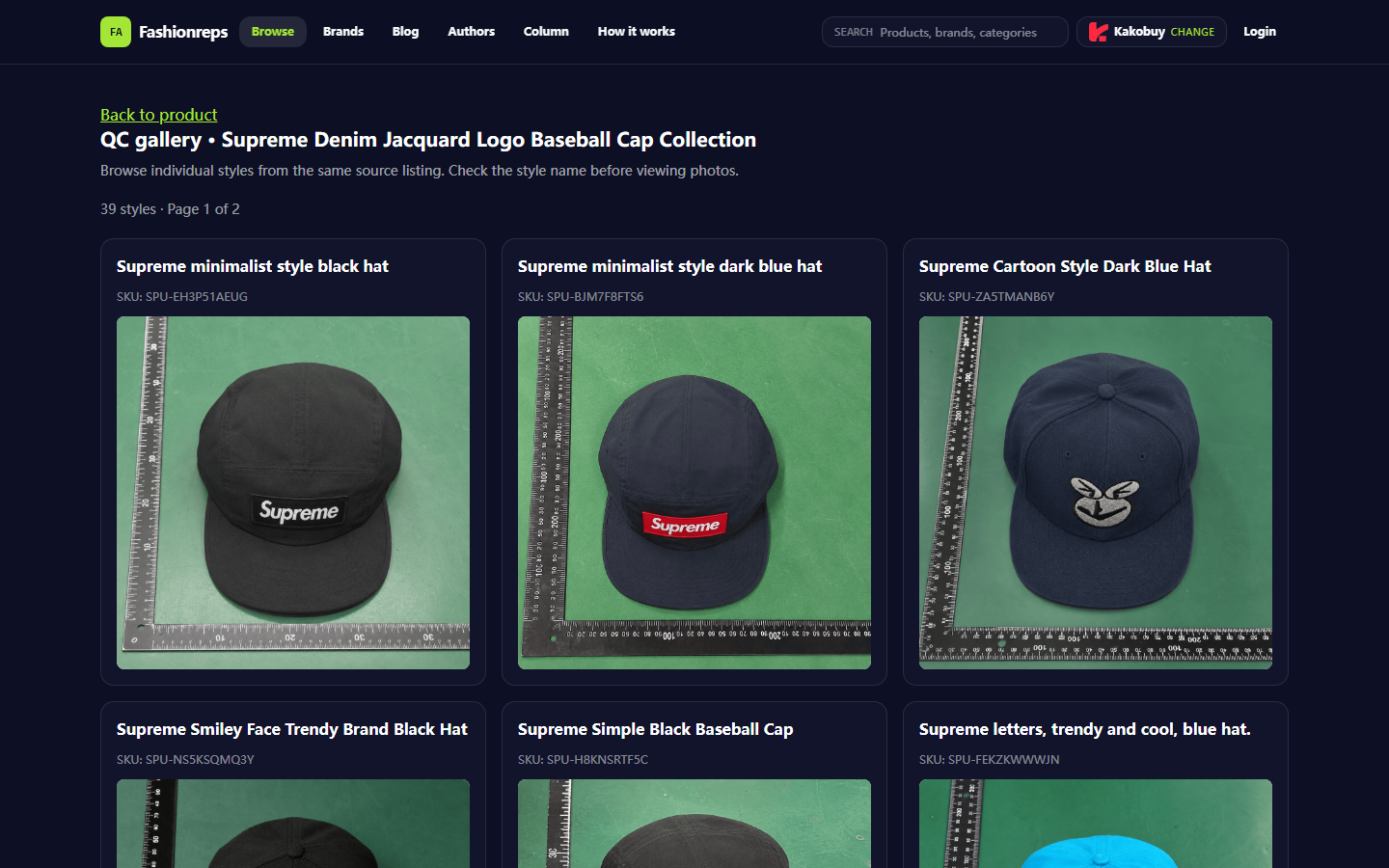
Figure: Example of style list and SKU information on a fashionreps Supreme hats QC page.
How to Find Candidate Hats by Category in fashionreps Spreadsheet
Fashionreps' website-style product catalog is better suited for discovery and browsing. The page provides brands, product categories, a search entry, and product detail pages; after entering the relevant QC page, you can see multiple styles from the same source list, and distinguish specific items by style name and SKU.
The current visible QC page shows that this collection contains 39 styles, divided into two pages. For example, the page simultaneously features black, navy, khaki, camo, knit hats, and hats with patterns. They cannot be recorded under the broad name "Supreme hat," as that easily mixes images or links of different styles.
It is recommended to filter in the following order:
- First confirm whether the product collection or category is related to the target hat type.
- Then read the complete style name, not just the brand name.
- Record the SKU displayed on the page as the primary identifier for subsequent comparison.
- Open the corresponding QC page to confirm that the images belong to that style, not other styles in the same collection.
- Save the product detail page and QC page URLs, marking their purposes separately.
"Supreme Denim Jacquard Logo Baseball Cap Collection" on the page is a collection name and cannot be directly used as the independent product title for each hat. When organizing, use the specific style name, such as "Supreme minimalist style black hat" shown on the page, and retain the corresponding SKU.
How to Set Up QC Images, Specs, and Link Fields in Google Sheets
Google Sheets is better suited for organizing scattered information from web pages into records that can be filtered, collaborated on, and reviewed. It cannot replace the product page, nor will it automatically prove that images and products belong to the same style; its role is to leave a clear trail of the verification process.
It is recommended to set up the following fields:
| Field | Purpose | Requirements |
|---|---|---|
| Record ID | Distinguish each candidate record | Use sequential numbering, avoid vague names |
| Product Collection | Record source collection | Enter the collection name displayed on the page |
| Style Name | Identify the specific hat | Preserve the complete name as shown on the page |
| SKU | Connect product and QC images | Record exactly as shown, note letters and numbers |
| Product Detail Page | Return to product info page | Put product link separately |
| QC Page | View quality check images | Put QC link separately |
| Image Status | Indicate if image is visible | Use statuses like "Visible", "Missing", "Pending review" |
| Link Status | Indicate if page can be opened | Use statuses like "Normal", "Broken", "Redirected", "Pending review" |
| Notes | Save unverifiable matters | Record only observable facts, no speculative conclusions |
In Google Sheets, you can use filters to view "Pending review" or "Image missing" records, and sort by SKU, color description, or collection name. When collaborating, the comment feature is suitable for raising questions, but final conclusions should be written back into explicit fields, otherwise they are easily overlooked during later review.
Do not copy entire web pages into cells. Web page text, product identifiers, and personal judgments should be stored separately to more easily spot mismatches and to update link statuses later. 🧾
How to Correspond Product Cards, QC Images, and External Links Item by Item
Each record needs at least one three-point correspondence check: whether the product card has a clear name, whether the QC page shows the same or relatable style information, and whether the external link still opens and points to the expected page.
You can use the following verification logic:
- Copy the complete style name and SKU from the product card.
- Search or locate the same SKU in the QC collection.
- Open the image corresponding to that SKU, confirm that the image description or page context does not point to another style.
- Return to the spreadsheet, record the product detail page and QC page separately.
- Open the external link again, record the current access result.
- If any field cannot be confirmed, set the status to "Pending review", do not fill in with speculation.
The most common mistake is treating a collection page as a single product page, taking the first image of the same collection as the target style image, or putting product links and QC links in the same column. Such records appear complete but actually cannot support pre-order judgment.
If the page only shows the style name without sufficient size, material, stock, or price information, write "Not shown on page" in the notes, do not infer from image appearance. Images can help confirm what the page displays, but cannot prove actual material, wearing comfort, or received quality. 🔎
Division of Labor Between Website Browsing and Spreadsheet Organization on Mobile and Desktop
Mobile is suitable for quickly browsing product cards, opening QC images, and eliminating obviously irrelevant styles. Desktop is better for viewing multiple pages simultaneously, copying SKUs, adjusting column widths, filtering statuses, and handling collaboration comments.
Recommended division of labor: "Discover on mobile, organize on desktop":
- Mobile: Bookmark candidate pages, check if images load, preliminarily eliminate styles that don't match the hat type.
- Desktop: Fill in name, SKU, product link, QC link, and status one by one.
- Google Sheets: Centrally handle filtering, sorting, comments, and review status.
- Before final order: Return to the website to recheck volatile fields such as price, stock, purchase entry, and page availability.
Do not treat old records in Google Sheets as current product facts. Product pages may update, links may redirect, and QC images may change. The spreadsheet stores the result of a particular check, not a permanent product guarantee.
How to Mark Broken Links, Missing Images, or Inconsistent Fields
When encountering anomalies, the most important thing is to preserve the problem status rather than forcibly complete the record. You can use the following status terms:
- Image missing: Page has style or SKU, but QC image cannot be displayed.
- Link broken: Page returns error, blank page, or cannot reach target content.
- Redirected: Link opens another page, need to reconfirm if it is still the same product.
- Field inconsistent: Conflicts among product name, SKU, collection name, or image context.
- Pending review: Current evidence insufficient, cannot judge yet.
If the product detail page opens but the QC page does not have the same SKU, do not directly assign adjacent style images to the current record. If the page only shows the collection name, do not assert specific hat color, material, stock, or price based on that.
When a link anomaly occurs, first record the access date, page result, and fields needing review. Fixed links must be reopened and confirmed, not updated based solely on old screenshots or historical addresses in the spreadsheet. ⏱️
What Page Facts Cannot Be Directly Inferred from Notes or Images
The following cannot be inferred solely from product images, collection names, notes, or SKUs:
- Actual material, thickness, and feel of the hat.
- Whether it fits a certain head size or wearing scenario.
- Workmanship details and complete quality level beyond the images.
- Current stock, final price, shipping, taxes, and payment methods.
- Whether the product is authentic or brand-authorized.
- Whether the external purchase platform accepts orders and supports returns/exchanges.
- Whether image capture time and page information are still valid.
These need to be verified on the corresponding product page, purchase platform rules, or logistics and after-sales pages. When recording, distinguish "clearly shown on page", "observed via link", and "unconfirmed"; do not write editorial judgments as product facts.
Next Steps After Completing the QC Spreadsheet
After each candidate record in the spreadsheet has name, SKU, product link, QC link, and status filled in, you can proceed in the following order:
- Filter out candidate styles with visible images and normal links.
- Recheck correspondence of name, SKU, and QC images individually.
- Revisit pages for time-sensitive information such as price, stock, size, or purchase entry.
- Keep unverifiable records as pending review, do not mix them into the ready-to-order list.
- After entering the selected purchase platform, recheck shipping, tax, after-sales, and destination country restrictions.
The value of this organization method is to reduce mismatches and repeated searches, not to replace order confirmation on the purchase platform. Final selection should be based on the latest page information and your actual needs; if product links, QC images, or key specs cannot correspond, holding off on ordering is usually safer than relying on guesses. ✅
Article Image
Editor score 4.2 / 5