This article solves a specific problem: when the same Supreme jacket shows inconsistent color, size, style, or stock fields across Fashionreps product cards, detail pages, or the shopping cart, how to determine if it's a display glitch, missing information, or incorrectly linked variants. After reading, you should be able to save evidence, cross-check item by item, and decide whether to pause your order. This method does not
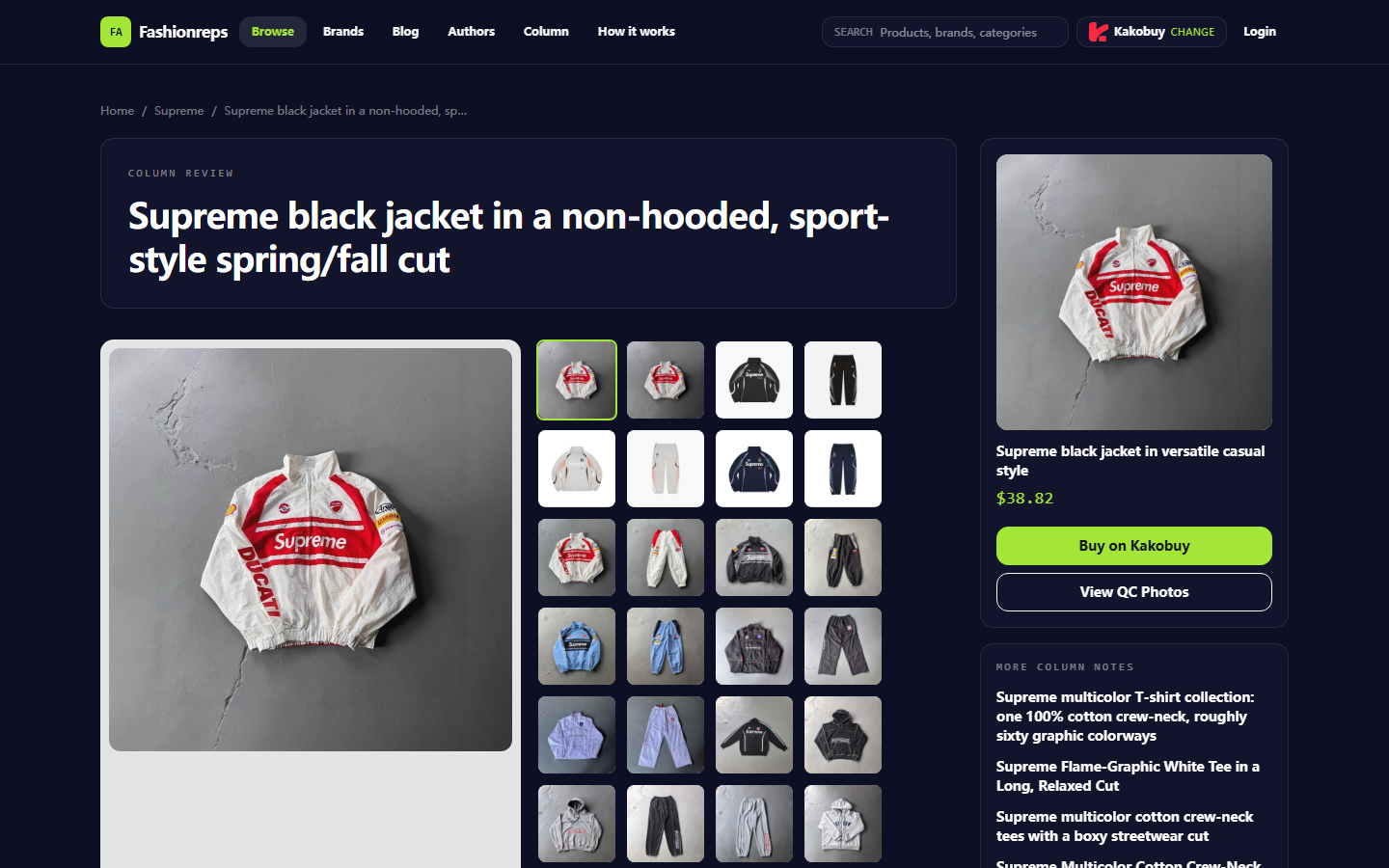
This article solves a specific problem: when the same Supreme jacket shows inconsistent color, size, style, or stock fields across Fashionreps product cards, detail pages, or the shopping cart, how to determine if it's a display glitch, missing information, or incorrectly linked variants. After reading, you should be able to save evidence, cross-check item by item, and decide whether to pause your order. This method does not apply to inferring authenticity, quality, or actual stock, nor does it replace final confirmation from shopping agents and sellers.

Figure: A reference view of a Fashionreps product page used for checking product variants.
Clarify the Task and Evidence Boundaries for Checking Supreme Fall/Winter Jacket Variants
Fashionreps is more of a product discovery and content display entry point; the purchase button on the page leads to your chosen shopping agent; it is not the seller, warehouse, or international logistics carrier. Therefore, page information can only serve as the starting point for pre-order verification and cannot alone prove that a certain color or size is in stock.
The subject of this check is a Supreme black jacket product record. The page summary shows it described as hoodless, long-sleeved, regular thickness, sizes S to XL, suitable for spring and autumn casual wear; the page also displays multiple color codes and different clothing categories. The page update time is recorded as September 26, 2026, and time-sensitive information like price still needs re-confirmation before actual operation. 🧭
Three things need to be clarified first:
- Which specific product link you are checking, not the entire Supreme category page.
- The variants you intend to purchase include color, size, and style, not just the product title.
- Your goal is to confirm whether the information corresponds, not to judge authenticity, quality, or stock guarantees based on it.
Save the Fashionreps Product Page's Title, Color, Size, and Update Time
First, save evidence of the product page within the same browser session to avoid mixing content from different pages or different shopping agents. It is recommended to record the following fields:
| Field to check | What to save | Significance when an anomaly is found |
|---|---|---|
| Product title | Complete page title and page URL | Title changes may indicate the product record has been updated or replaced |
| Variant information | Color code, color name, size range, style description | When only some fields are shown, it cannot be considered complete variant information |
| Page status | Whether the page loads normally, whether it shows blank, redirects, or prompts for login | Can distinguish loading anomalies from missing content |
| Update time | The update date or crawl date shown on the page | Price, stock, and link status may have changed |
| Purchase entry | Currently selected shopping agent and button status | Different agents may present different subsequent fields |
When saving, capture a screenshot that shows the title, variant area, and update time simultaneously. Personal account, order number, payment information, and full shipping address should not appear in the screenshot. If the page only shows a generic product description, do not treat it as independent proof for a specific color or size.
Cross-Check Variant Information Across Product Card, Detail Page, and Shopping Cart
Follow this order to avoid entering the payment page before checking the information:
- On the product card, record the title, main image, price hint, and color or size summary.
- Open the detail page and check if the style description still points to a jacket, not pants, T-shirt, hoodie, or shorts under the same record.
- Select the target color and size one by one, and observe whether the page title, main image, option values, and purchase button change synchronously.
- After entering the shopping agent's confirmation page, only check the product name, color, size, and quantity shown in the cart; do not submit payment.
- Compare the fields from the three positions side by side, and record whether each field is the same, missing, conflicting, or unable to load.
A safe rule of thumb: only proceed to the next step of price inquiry or stock confirmation when the product link, style, color, size, and cart record correspond to each other. A price difference does not necessarily mean a variant error, because the page price may be a reference price; the final product price, service fee, and international shipping should be based on the shopping agent's page. 💰
Distinguish Page Loading Anomalies, Missing Fields, and True Variant Mismatches
Different page behaviors require different handling.
Page loading anomalies
Common symptoms include the options area continuously spinning, fields temporarily appearing after refresh, images failing to load, buttons not responding to clicks, or the same link showing different content in different network environments. At this point, first save the time, page status, and error message, then try once in an incognito window or reopen the page. Do not repeatedly submit the cart or click the purchase button to avoid generating duplicate requests.
Missing fields
If the page loads normally but does not provide complete color, size, material, or stock information, this is insufficient evidence; it does not mean there is no stock, nor does it mean all options are purchasable. In this case, mark the missing field as "not provided" and ask the shopping agent or seller for the specific variant.
True variant mismatches
When the same product link shows black S to XL on the detail page, but the cart shows a different color or size, or when selecting a color does not change the main image or title at all, stop the operation. This situation may come from product record merging, option mapping errors, page caching, or seller link updates, but the cause cannot be determined solely from page appearance.
Do not interpret multiple clothing categories appearing on the same page as "a set includes all items." Ask the other party to confirm the specific product, color, size, quantity, and unit price. ⚠️
Verify That Images, Product Links, and Visible Stock Status Correspond
Images can only help confirm whether the page has switched to a different style, not prove the actual color, material, or stock. When checking, pay attention to the following relationships:
- After selecting black, does the main image still show the same hoodless jacket?
- When selecting different sizes, do the product title and price maintain the same style logic?
- Does the product link on the detail page belong to the same record as the link in the cart?
- Does the stock hint shown on the page refer to a specific color and size, rather than the entire product record?
- Is the reference price being misread as the final payment amount?
Current page information describes the product as polyester or synthetic blend, but the material details only show "Other: 100%" without a complete ratio. Therefore, this field cannot be used to confirm the fabric, nor to judge warmth. The page also positions it as spring and autumn wear, which cannot be directly extended to being suitable for severe winter. Regarding sizing, the fit claim in public records comes from the Supreme x Ducati series, which is insufficient to prove the sizing performance of this jacket. 📏
Stop Operations and Prepare Official Assistance When Information Cannot Be Matched
If any of the following occurs, stop payment, stop repeatedly adding to cart, and preserve evidence:
- Color, size, or style differs between the product page and cart.
- Option names are empty, duplicated, unselectable, or nothing changes on the page after selection.
- The main image, title, and detail description obviously belong to different clothing categories.
- The page shows stock but does not specify the corresponding color and size.
- The product link redirects, opens a blank page, or goes to an unrelated page.
- The shopping agent cannot confirm the seller link, variant code, or actual purchasable status.
When preparing to ask for help, provide the product link, screenshot time, target color, target size, page display value, and cart display value. Only redact personal information; do not send passwords, payment cards, complete shipping labels, or unnecessary order data. Prioritize using the purchase agent entry shown on the Fashionreps page, the logged-in customer service channel, or the official support page of the corresponding shopping agent; do not handle payments through unverifiable third-party contacts. 📨
The help request can be written as:
"Please confirm the specific style, color, and size corresponding to this product link. The product detail page shows [fill in detail page content], the cart shows [fill in cart content], and the two are inconsistent. I have not paid yet. Please confirm the actually purchasable variant, stock status, unit price, and subsequent fees."
Before receiving a clear reply, do not test the page by changing colors, reselecting sizes, or repeatedly submitting orders, as these actions may cause incorrect purchases or duplicate orders.
Do Not Infer Quality, Authenticity, or Stock Guarantees from This
Consistent variant information only means that the page fields temporarily correspond to each other; it cannot prove product quality, brand authenticity, workmanship, fabric ratio, or seller fulfillment capability. The reference price on the page also cannot replace the shopping agent's final quote; service fees, international shipping, taxes, and destination country import requirements need to be confirmed separately.
Similarly, the page showing S to XL does not mean every size is currently in stock; showing a certain color does not mean the warehouse has already accepted that color. If further risk reduction is needed, after the shopping agent confirms purchasability, re-check warehouse intake photos, measured data, and after-sales window. Do not write unconfirmed warehouse inspection or receipt results as accomplished facts.
Pre-Order Review Checklist and Next Steps
After completing the following checklist, decide whether to continue:
- [] The product link opens normally and does not redirect to an unrelated page.
- [] The product title, main image, and details all point to the same jacket.
- [] The target color and size are clearly displayed on the detail page.
- [] The color, size, and quantity in the cart exactly match the target.
- [] The visible stock status clearly corresponds to the specific variant, or has been confirmed by the shopping agent.
- [] The final product price, service fee, shipping, and possible taxes have been confirmed separately.
- [] The page screenshot has had personal information removed, and the verification date is recorded.
- [] If information still conflicts, payment has been stopped and official help has been requested.
If it's just a brief page loading anomaly, you can save evidence and reopen to re-check once; if it's missing fields, wait for the seller or shopping agent to supplement information; if it's a real conflict between the detail page and cart, pause that link and look for an alternative product record whose information corresponds. This process is suitable for those who need to confirm variants before ordering, not for those who treat page summaries as guarantees of stock, quality, or authenticity.
Editor score 4.2 / 5