Organize Bape: Spreadsheet vs Google Sheets If you're searching for Bape items on Fashionreps, the real challenge isn't usually "seeing more links"—it's recording the candidates you're interested in so you can later double-check images, specs, product pages, and update times. This article focuses on one specific task: first discover candidates on Fashionreps' Bape brand page, then use Google Sheets to build a lasting record for screening. After reading, you should be able to do three things: c
If you're searching for Bape items on Fashionreps, the real challenge isn't usually "seeing more links"—it's recording the candidates you're interested in so you can later double-check images, specs, product pages, and update times. This article focuses on one specific task: first discover candidates on Fashionreps' Bape brand page, then use Google Sheets to build a lasting record for screening.
After reading, you should be able to do three things: confirm how the site's brand page is best browsed, design a sheet suitable for Bape candidates, and identify inconsistencies among names, images, and specs before you prepare for further inquiry or ordering.
This article does not apply to authenticating products, verifying seller credibility, calculating final landed cost, nor does it replace product detail pages, shopping agents, or destination country's tax and import regulations. The following site information was checked against pages visible on October 9, 2026; prices and product status may still change. This article is based solely on visible page information from Fashionreps' site-based spreadsheet, and makes no claim of actual purchase, receipt, or wearing experience. 🙂

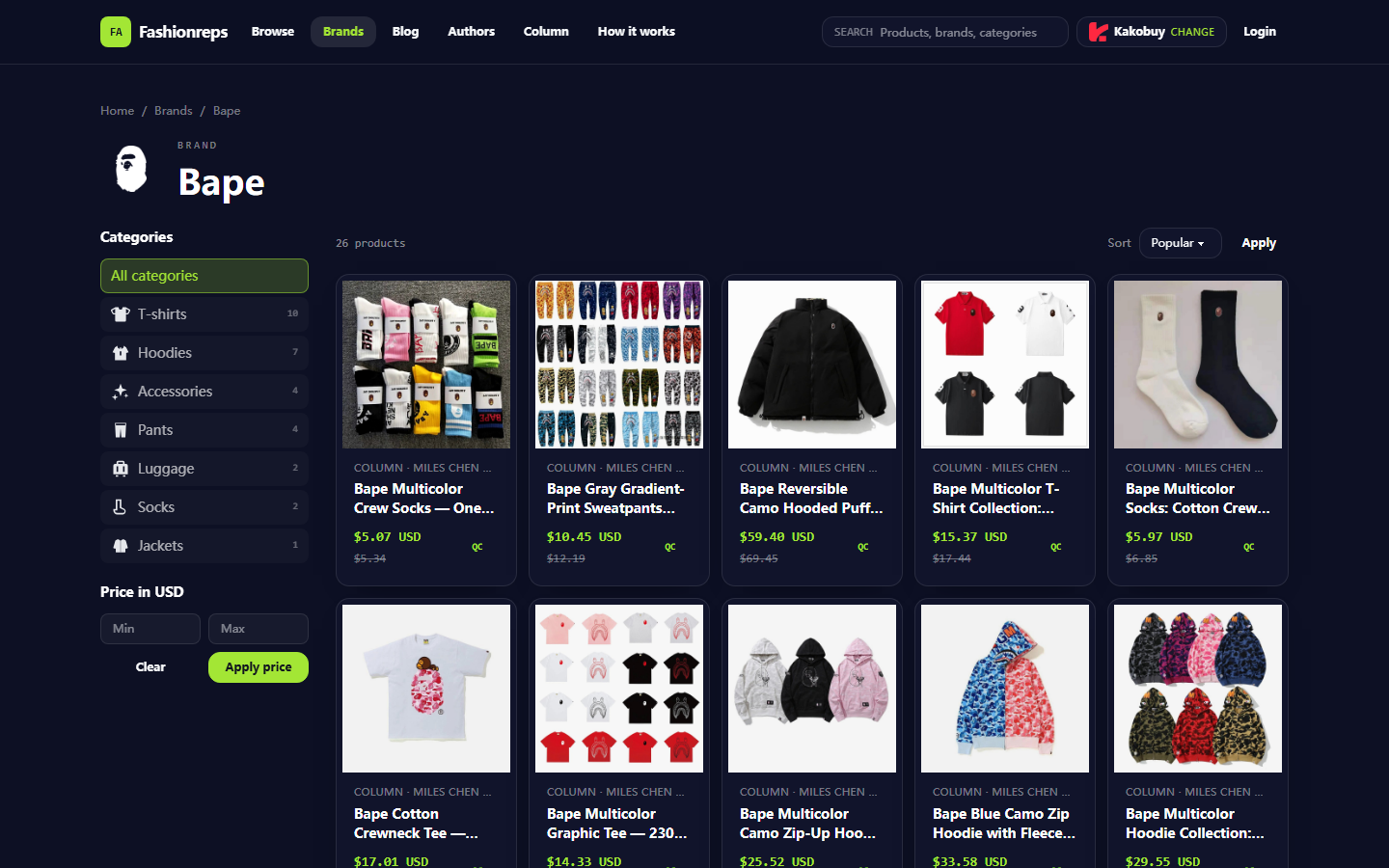
Image: Fashionreps Bape brand page's visible product catalog and filtering interface.
What Filtering Task This Bape Brand Browsing Aims to Solve
It's recommended to first write the problem as one actionable sentence: I want to screen the Bape candidates on Fashionreps for items worth further verification, and keep enough information to compare category, price, size, images, and page status.
This task involves two distinct stages:
- Discovery stage: Quickly browse the brand page by category, price, and sorting.
- Organization stage: Copy candidates into a personal sheet, adding verification status, variants, notes, and next actions.
The site-based spreadsheet is more like a catalog and navigation entry, good for seeing what types of products exist; Google Sheets is more like a personal workbench, good for long-term saving, filtering, sorting, and multi-person collaboration. They aren't a matter of "which is better" as substitutes, but rather serve discovery and organization respectively.
Note that the product names, images, prices, and detail page content on the brand page are not always fully consistent. The catalog has already shown instances where the name or color description does not perfectly match the visible product features, so candidate records cannot be taken directly as purchase conclusions. 🔎
First Verify the Brand Page and Product Cards in Fashionreps' Site-Based Spreadsheet
Fashionreps' Bape brand page displays brand navigation, product categories, price filtering, and sorting entry. The visible catalog contains 26 items, with the following counts by category: T-shirts 10, Hoodies 7, Accessories 4, Pants 4, Luggage 2, Socks 2, Jackets 1.
The page also offers four sorting options: Popular, Latest, Price: low to high, and Price: high to low. Price filtering requires entering a minimum and maximum price, and the page shows USD reference prices along with some items' previous reference prices.
From the visible samples on the brand page, the product types cover a wide range:
- T-shirts, including oversized pure cotton, printed, 230g cotton, and multi-color series.
- Hoodies, including zip-up, pullover, camo, fleece-lined, and different color series.
- Shorts and sweatpants, including drawstring waist, camo print, and various size ranges.
- Socks, backpacks, and travel bags.
- One down jacket type item, along with several cards distinguished by pattern, fabric weight, or color.
This information helps decide "what to look at first," but is not enough to support "whether it's suitable to buy." For example, some titles include size range, fabric weight, or lining information, but you still need to enter the corresponding product page to check images, variants, and available options.
What Columns Are Needed to Build Bape Candidate Records in Google Sheets
The point of a sheet is not to copy every product, but to leave information that supports your next judgment. At minimum, set up these columns:
| Field | Purpose | Suggested entry |
|---|---|---|
| Candidate ID | Avoid re-discussing the same item | BAPE-001, BAPE-002 |
| Site product name | Preserve original identifying info | Copy the page's visible name directly |
| Category | Support categorized filtering | T-shirts, Hoodies, Accessories, etc. |
| Reference price USD | Aid preliminary comparison | Record verification date; not final landed cost |
| Size or variant | Judge whether worth further checking | Record clearly shown range and colors |
| Image verification status | Judge if images suffice for selection | Not verified, partially matched, needs recheck |
| Product page status | Judge if link still works | Accessible, redirect, empty page, pending |
| Name-image consistency | Identify catalog info risk | Consistent, questionable, cannot determine |
| Next step | Make record actionable | Open page, ask about size, drop candidate |
| Last verified date | Control timeliness | Use YYYY-MM-DD format |
Google Sheets' filter views help you see only candidates marked "needs recheck" or "price below a certain range"; sorting functions make it easy to focus on recently added, lower-priced, or a specific category. If collaborating with others, you can use comments or a separate "reviewer" column to mark who handles next steps, but do not put order numbers, complete shipping labels, payment card info, or other personal data in a shared sheet.
For Bape items with many pattern and color variations, it's recommended to separate "product name" and "your own short identifier." For example, keep the original page text in the name field, and write the short identifier as "black-white print tee" or "blue camo zip hoodie." This keeps things readable without overwriting the original facts.
How to Compare Product Images, Specs, Links, and Update Times Item by Item
When organizing candidates, check in a fixed order to avoid looking only at title or price:
- Check if the product card has a clear product name and category.
- See if the main appearance in the image matches the color, category, and fit in the name.
- Record size, fabric, weight, lining, and variant info that clearly appears on the page.
- Open the product page, confirm it is accessible and not a redirect, 404, blank page, or a page with only tags.
- Compare the brand page card with the product page for different names, colors, or specs.
- Fill in the last verified date, and mark anything unconfirmable as "needs recheck"—do not fill in with speculation.
On Fashionreps' Bape page, one product card's name mentions a green T-shirt, but the visible catalog summary describes a black-and-white colorway with fleece-lined zip hoodie. This kind of inconsistency cannot simply be treated as a product error, nor can it be taken as reliable product info; the correct approach is to list it as a discrepancy, open the product page, and compare name, main image, and specs again.
Similarly, descriptions like "multi-color series," "90+ colorways," or "sizes up to 6XL" indicate a wide range of choices on the page, but not that all colors and sizes are in stock at the time you're viewing. In the sheet, record "page-displayed range" and "currently selectable variants" separately. 🧾
Different Operation Paths for Site Browsing vs. Sheet Filtering in Brand Discovery
The site brand page's advantage is contextual concentration. You can view categories, reference prices, card names, and sorting within a single brand scope, without first setting up fields; it's suitable for a quick first look at the catalog structure.
Google Sheets' advantage is turning one browsing session into a repeatable filtering process. You can add your own status columns, record discrepancies, compare candidates, and next time only deal with unfinished items. But these advantages depend on you actively maintaining the data; the sheet won't automatically ensure product pages are still valid or prove that images match specs.
The two paths can work together like this:
- Step 1: Browse Fashionreps' Bape brand page by category or price range.
- Step 2: Add only candidates you truly consider for further verification to Google Sheets.
- Step 3: After opening the product page, supplement images, specs, sizes, and link status.
- Step 4: Mark conflicting records as "needs recheck" rather than deleting or changing to a definite conclusion.
- Step 5: Recheck page and variant status before preparing to inquire or order.
If you just want to quickly discover what product types Bape has, the site page saves organization effort; if you need to compare multiple candidates simultaneously, filter repeatedly, or collaborate with others, Google Sheets is more suitable as a follow-up record tool. Here "more suitable" refers to operation path and record purpose, not to untested speed, stability, or purchase outcomes. 📊
What Information Suits Quick Browsing vs. Long-Term Organization
Information suitable for quick browsing on the site includes: what categories exist under the brand, approximate names on product cards, sorting options provided, reference price ranges, and which candidates are worth opening further.
Information suitable for writing into a long-term sheet includes: candidate ID, original page name, category, reference price, clearly displayed sizes or variants, image-name match status, product page accessibility, discrepancy notes, and last verified date.
What should not be written into the sheet without evidence includes: authenticity judgments, seller reliability, actual stock, final shipping, taxes, arrival time, wearing effect, material feel, and after-sales results. Even if a product title mentions cotton, fleece, or a certain gram weight, you can only record the page's claim, not rewrite it as a conclusion confirmed by physical touch or independent testing.
If further ordering is needed, product prices should also be treated as reference only. Final cost may be affected by shopping agent service fees, domestic shipping, storage, inspection, consolidation, international shipping, taxes, and destination country's customs clearance requirements. Any matter involving truthful declaration, import restrictions, and taxes should be based on destination country regulations and the actual service page—costs should not be lowered through under-declaration, split shipments to avoid tax, or evading inspection.
Verification Boundaries for Link Status, Product Variants, and Page Timeliness
A clickable catalog entry does not equal a fully verified product record. When organizing Bape candidates, at least distinguish these statuses:
- Discovered: Product card appeared on the brand page.
- Page pending: Product page not yet opened, details unconfirmed.
- Accessible: Product page opens normally and shows clear product info.
- Info questionable: Conflicts among name, image, category, or specs.
- Variant pending: Page mentions multiple colors or sizes, but current options unconfirmed.
- Excluded from comparison: Page redirects, 404, blank, or insufficient info.
The value of recording status is preserving judgment boundaries. Catalogs update, prices change, links may break, variants may disappear. Therefore, the "last verified date" column is not decorative—it reminds you when to recheck.
If a candidate involves multiple items, first confirm the page status of each before discussing consolidation. Consolidation may reduce repeated first-weight charges or some operation costs, but may also increase parcel value, volumetric weight, and single-shipment loss risk; splitting may add fixed fees but could suit route restrictions or lower per-parcel risk. Without sample data on parcel weight, dimensions, route, insurance, and destination country rules, no uniform cost-saving conclusion can be given.
Next Actions After Completing Bape Candidate Organization
After completing the initial sheet, proceed in this order:
- Filter out candidates that are "accessible" and "name-image basically match".
- Separately review records marked "info questionable" and "variant pending".
- Reopen product pages you plan to continue with, confirm current price, page status, and available specs.
- Organize size issues, color issues, or image discrepancies into specific questions, then consult the shopping agent or relevant page.
- When multiple items are involved, separately estimate costs, risks, and route restrictions for consolidation vs. splitting.
- Only proceed to ordering judgment when product info, variants, costs, and destination compliance requirements are all clear.
This method saves time on repeated searching and organizing, but does not guarantee product quality or lower all costs. It suits people who need to compare multiple Bape candidates, want to keep verification records, or need to collaborate with others.
Situations where this organizing approach is not recommended include: you only want to view one item temporarily, have no time to maintain statuses, or you need real-time inventory, authenticity verification, final shipping and customs conclusions. In those cases, a personal sheet may add maintenance cost; directly viewing the current product page and confirming with the relevant service provider is more appropriate.
The ultimate practical judgment can be summarized as: use Fashionreps' site-based spreadsheet to discover brand scope and candidates, use Google Sheets to save reviewable screening records; check name, image, specs, links, and update times item by item; keep uncertain content as discrepancies. What this saves is browsing and organizing time, and what it increases is the risk of outdated sheets, conflicting catalog information, and mistaking reference prices for final costs. It suits candidate organizers willing to do secondary verification, not those who treat catalog cards as a purchase guarantee.
Agent Platform Shopping FAQ
1. What product categories can be browsed on kako-sheet.org?
On kako-sheet.org, the product categories are very comprehensive, including shoes, T-shirts, sweaters, hoodies, jeans, sweatpants, shorts, board shorts, factory clearance items, down jackets, baseball shirts, shirts, hats, jewelry, bags, electronics, sunglasses, socks, underwear, and trendy collectibles.
2. What product types can be found in the spreadsheet on kako-sheet.org?
The spreadsheet provided by kako-sheet.org covers footwear, clothing, bags, accessories, jerseys, perfumes, hats, scarves, belts, and various home lifestyle products.
Editor score 4.2 / 5