If you're planning to buy a pair of New Balance retro-style shoes, your platform choice shouldn't be based solely on whether similar images appear on the product page. More importantly, confirm whether different platforms refer to the exact same product, whether you can view correspondin

If you're planning to buy a pair of New Balance retro-style shoes, your platform choice shouldn't be based solely on whether similar images appear on the product page. More importantly, confirm whether different platforms refer to the exact same product, whether you can view corresponding QC photos, whether colors and sizes match, and which fees are clearly shown at final checkout.
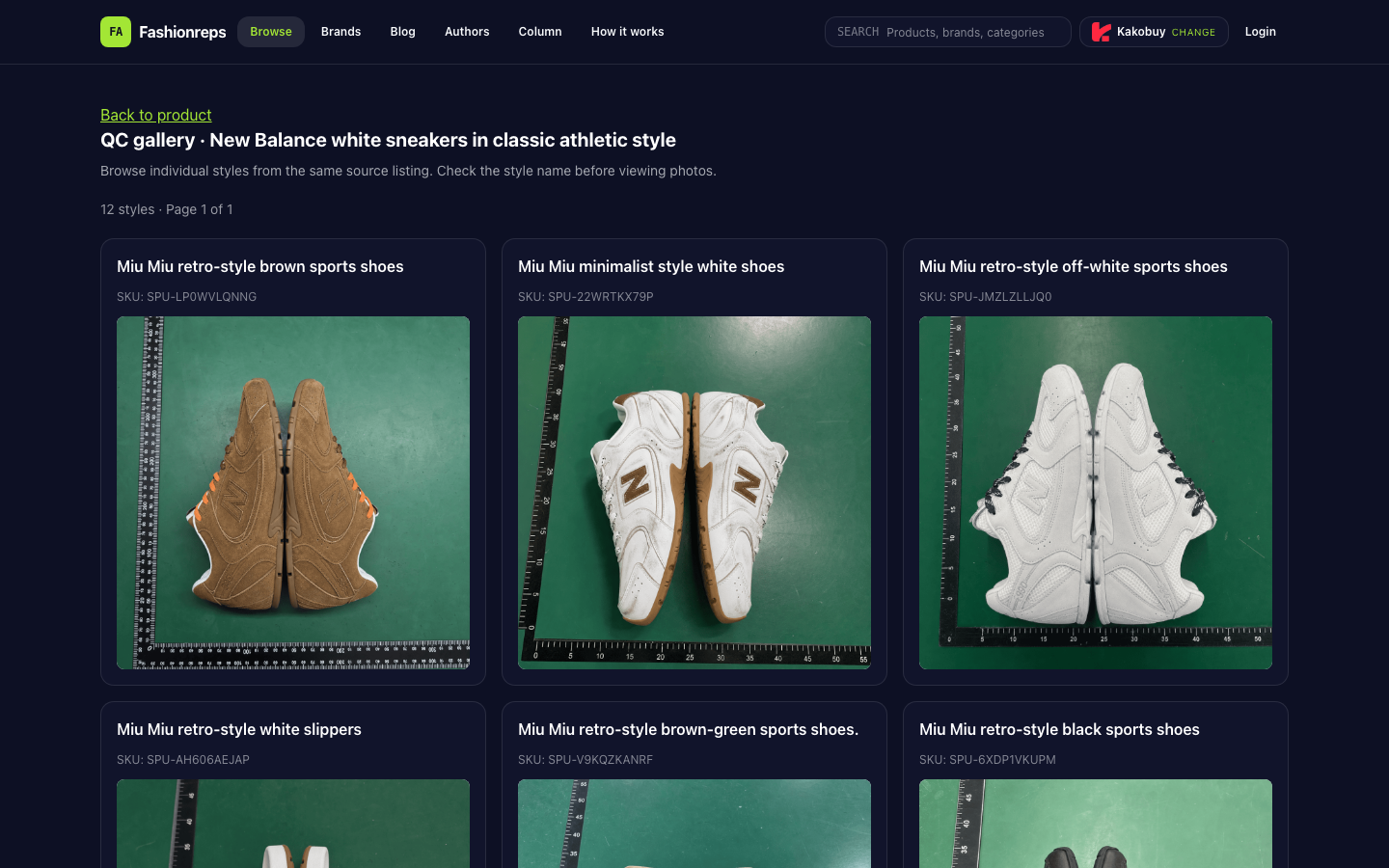
The currently verifiable Fashionreps page serves as a QC photo entry point. The page states that the buy button redirects to a selected shopping agent, with orders, payments, and shipping handled by the external agent's website. Thus, it's more suitable as a product lead and QC evidence source, rather than a platform for completing the entire purchase process directly.
First, Confirm It's the Same Shoe
Same brand, similar colorways, or similar silhouettes do not mean the same product. When comparing platforms, start by creating a unified record for candidate shoes:
- Product name or style name
- Product images and main colorway
- Seller link or source link
- SKU, style code, or other identifying information
- Available colors and sizes
- QC photo entry point
- Product price
- Service fees, payment fees, and shipping fees
- Amount shown on final checkout page
The relevant Fashionreps page is titled "New Balance white sneakers in classic athletic style," but the page also displays other styles from the same source list, including Miu Miu retro sneakers and slides, totaling 12 styles. The page also notes that you should verify the style name before viewing images. This means you cannot rely solely on the page title or images to assume a particular QC photo corresponds to the target New Balance shoe.
When actually verifying, compare the target product name, style name, and SKU together. If you can only see similar images and cannot confirm the style identity, mark it as "to be verified" rather than directly recommending it as the same style.
What to Compare Between Fashionreps and Other Platforms
In the currently verifiable materials, the Fashionreps page clearly displays a QC gallery and offers multiple shopping agent options, such as Superbuy, Mulebuy, JoyaGoo, Sugargoo, CSSBuy, AllChinaBuy, etc. The page's function is to let users select an agent, then proceed to the corresponding external agent website via the buy button.
However, the existing evidence does not provide a unified product page, real-time pricing, inventory, shipping costs, service fees, or complete checkout results from these agents for the same New Balance product. Therefore, you cannot conclude that one agent is cheaper, faster, or more reliable. When comparing with other platforms, it's advisable to compare only the following verifiable fields:
| Verification Item | What Fashionreps page confirms | Evidence needed from other platforms |
|---|---|---|
| Product identity | Page title, style name note, QC gallery, and source list | Same style name, SKU, seller link, or source page |
| QC evidence | Can access QC photo page, but must first confirm style | Corresponding QC photo link for the product and style mapping |
| Ordering path | Select shopping agent then redirect to external agent website | Whether product page directly corresponds to target style and seller |
| Fee information | Current source does not provide unified price or checkout amount | Product price, service fee, payment fee, shipping fee, and final total |
| Purchase status | Current data insufficient to confirm inventory or purchase availability | Real-time inventory, available sizes, and valid purchase link |
This table compares evidence completeness, not platform rankings. If a platform only shows product images without identification information or QC links, you cannot consider it fully verified just because the page looks more complete.
A Practical Same-Style Verification Process
Step 1: Lock in one candidate
Start with the target colorway and silhouette, and keep only one candidate product. Record the displayed name, images, SKU, and seller link. If a page mixes multiple styles, open each item and confirm the specific style; do not mistake other products in the source list for the target shoe.
Step 2: Check the QC entry on Fashionreps
After entering the corresponding QC page, first check whether the page title and style name match the candidate product, then verify that the images indeed belong to that style. If the page only shows similar styles or the style name doesn't match, stop using those images as evidence for the target product.
Step 3: Look for the same identification fields on other platforms
Open product pages on other platforms and prioritize checking SKU, seller link, style name, and colorway. If images are similar but other identification fields are missing, record as "visually similar, identity unconfirmed."
Step 4: Record checkout fields separately
Do not treat the price shown on the product page as the final cost. Go through the checkout process on the agent or shopping platform and record product price, service fee, payment-related fees, shipping fee, and any other clearly listed charges. The current source does not provide these values, so we cannot estimate the total for users.
Step 5: Check links and purchase status
If the link is broken, the product page won't open, sizes are unavailable, or inventory status is unclear, you cannot write that product as a purchase recommendation. You can keep it as a lead for verification, but clearly state the limitations.
When to Continue Verifying vs. Switch Platforms
Situations where you can continue verification:
- Target style name matches the QC page
- Product identity has at least two of the following cross-confirmed: name, SKU, or seller link
- QC photos clearly belong to the target style
- External agent page opens and shows available colors or sizes
- Checkout page separately displays major fee fields
Situations where switching platforms or pausing the order is appropriate:
- Only similar images visible, cannot confirm same style
- QC page lists multiple styles without clear mapping
- Other platforms lack seller source or product identification info
- Price, inventory, shipping, or service fees can only be guessed
- Link is broken, or product status cannot be confirmed
Conclusion: Treat Fashionreps as a Verification Entry, Not as Complete Checkout Evidence
Based on the currently verifiable page, Fashionreps' strength lies in providing product leads, a QC gallery, and shopping agent selection. It helps you start verifying styles and images, but the page itself does not prove the external agents' real-time pricing, inventory, shipping costs, or final checkout amounts.
Therefore, when choosing a platform, evaluate each against four criteria: same style confirmed, QC correspondence, clear fee structure, and verifiable links. Only prepare to order when all four are satisfied; if only one or two are met, continue investigating or pause the purchase, rather than making platform quality judgments based solely on image similarity.
Editor score 4.2 / 5