Defining the Checkout Verification Task for Loewe Accessories If you're browsing Loewe products on fashion-reps and continuing via your chosen shopping agent, the most important thing before checkout is not to hunt for a flashy discount number first—it's to confirm whether the coupon actually applies to your current products, amount, shipping route, and order status. 🎯 This guide is for users planning to purchase Loewe clothing, shoes, or fragrances and want to verify coupon conditions befor
Defining the Checkout Verification Task for Loewe Accessories
If you're browsing Loewe products on fashion-reps and continuing via your chosen shopping agent, the most important thing before checkout is not to hunt for a flashy discount number first—it's to confirm whether the coupon actually applies to your current products, amount, shipping route, and order status. 🎯
This guide is for users planning to purchase Loewe clothing, shoes, or fragrances and want to verify coupon conditions before payment. After reading, you should be able to complete a traceable checkout check, knowing which information is confirmed, which remains unknown, and when to pause payment.
It does not apply to scenarios requiring guessing hidden coupon codes, bypassing platform restrictions, underdeclaring item values, or guaranteeing savings. The currently available materials contain no verifiable Loewe-specific coupon codes, discount percentages, validity periods, or official stacking rules, so this article only explains verification methods and does not present unknown promotions as current ones. ⚠️

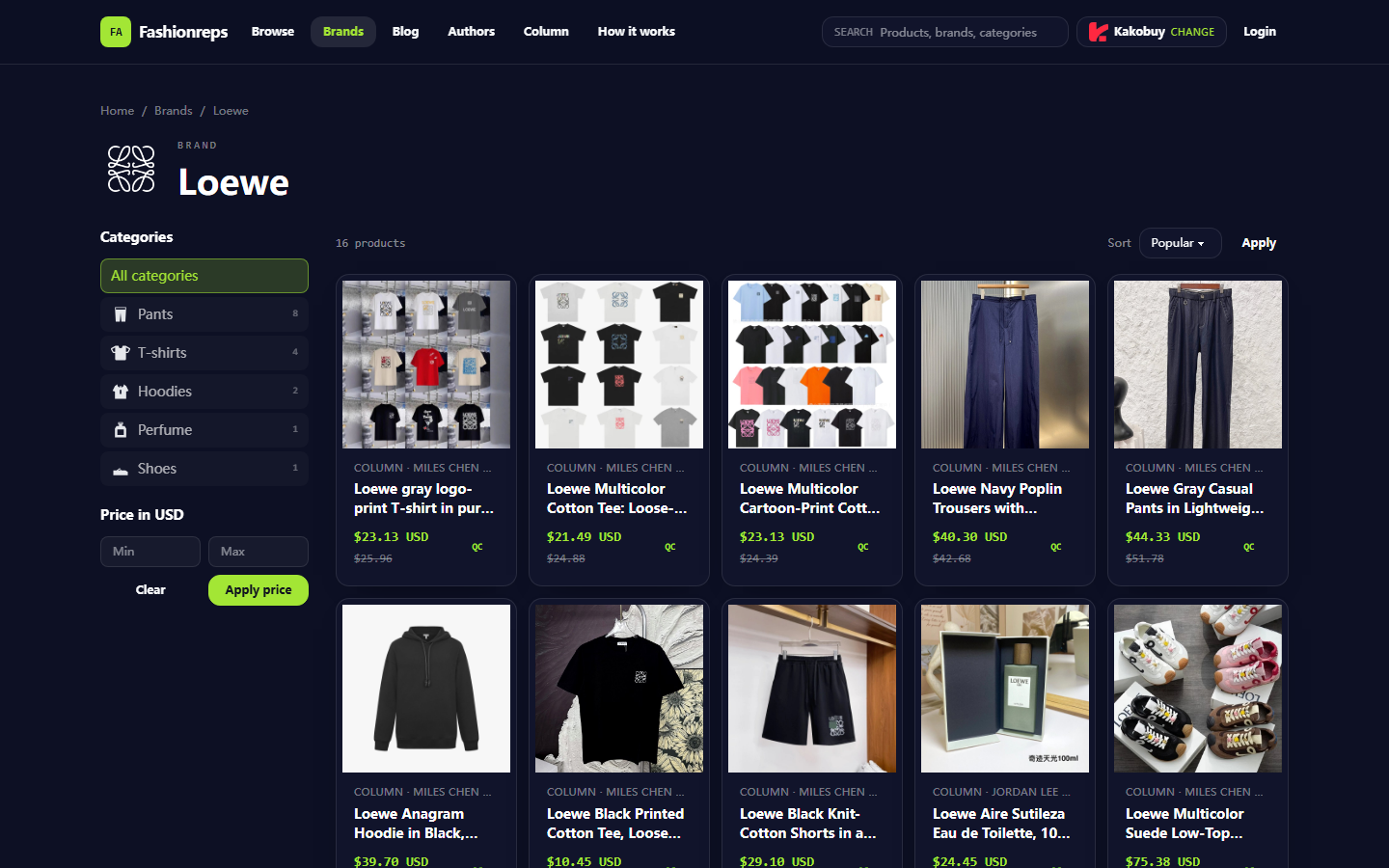
Image: Loewe brand catalog page on fashion-reps. The page displays product categories and reference prices, but catalog information itself does not equate to coupon rules or final checkout amounts.
Recording Product and Current Payable Information from fashion-reps Product Pages
Start by opening the specific product page, not just relying on brand catalog or search results. The brand page currently displays Loewe product categories, including pants, T-shirts, hoodies, fragrances, and shoes; the reference prices on the page can only serve as product display information and cannot be directly used as the product amount, shipping fee, or discounted price at payment.
Before proceeding to agent checkout, it's recommended to save the following:
- Product name, color, size, and quantity
- Current product price and currency shown on the product page
- Whether the product page displays stock, specification differences, or seller notes
- Product link or page identification information
- The selected shopping agent name
- The product amount displayed after entering the agent page
The buy button on fashion-reps will redirect to the external agent website based on the user's selected shopping agent. Orders, payments, and logistics are handled by the agent website, so the display price on fashion-reps product pages and the product amount in the agent checkout page may not be the same cost basis. Do not directly use old reference prices, strikethrough prices, or historical prices from the catalog to calculate final savings.
Verifying Coupon Claim Entry, Validity Period, and Applicable Scope
Coupons must be obtained from a current page or account entry that states the rules. When checking, record the coupon name, denomination or discount method, claim time, expiration time, and applicable platform. If a page only shows a coupon code of unknown origin, or you only see "someone used it" in third-party posts, do not treat it as a confirmed discount.
It's recommended to verify in the following order:
- Check the coupon center, promotion page, or checkout page prompts in the actual shopping agent account used for ordering.
- Confirm the coupon belongs to the current agent, not fashion-reps, another agent, or another activity.
- Check whether login, new user binding, minimum purchase, or specific payment method is required.
- Record the start and end times and confirm which time zone is used.
- Check whether the discount is automatically applied, manually claimed, or must be entered as a code at checkout.
- Save the coupon status as a screenshot or text record for review, but do not publicly share order numbers, payment information, or complete shipping details.
If the entry only shows "claimable" without displaying specific applicable conditions, do not count the discount into your budget in advance. Claimable does not mean the usage conditions are already met. 🧾
Checking Category, Brand, Amount, and Route Exclusions
Loewe products are not automatically within the same discount scope. A promotion may only cover clothing, or may exclude shoes, fragrances, specific sellers, specific warehouses, or specific promotional items. Even if the coupon name includes the brand name, you should check the category and product restrictions in the rules item by item.
At minimum, verify the following exclusions:
- Whether it only applies to designated categories or designated products
- Whether fragrances, shoes, accessories, or limited-time products are excluded
- Whether already discounted, clearance, or products using other promotions are excluded
- Whether minimum purchase is calculated on product amount, discounted amount, or amount including shipping
- Whether a single product or the entire order must meet the threshold
- Whether it is restricted to new users, designated accounts, or designated payment methods
- Whether certain warehouses, shipping countries, or logistics routes are restricted
- Whether taxes, insurance, handling fees, and other surcharges are excluded
For example, meeting the product amount threshold does not mean the entire order including international shipping will receive the same discount. Conversely, meeting the product threshold does not mean the discount will offset logistics fees. Only when the rules explicitly state the calculation scope can that fee be included in the discount calculation.
Confirming Whether the Coupon Can Be Stacked with Other Conditions
At checkout, you should distinguish between product price adjustments, coupons, agent activities, payment discounts, and logistics discounts. They may act on different fees or be mutually exclusive.
Focus on the following expressions:
- Whether it can be used in conjunction with other discounts
- Whether only one coupon can be used per order
- Whether the highest discount is automatically selected
- Whether product discounts are applied first, then coupon thresholds calculated
- Whether other activities must be canceled before using this coupon
- Whether the coupon only offsets product amount, not shipping, insurance, or taxes
- Whether payment discounts are provided separately by the payment service provider and not part of the agent coupon
If the checkout page shows multiple discounts at the same time, do not just look at the total discount number. Click or expand each rule item by item to confirm which part of the amount each one actually reduces. If two discounts appear to be shown simultaneously, but the total only reduced by one corresponding amount, the checkout details should prevail.
Checking Discounted Amount and Fee Basis Item by Item on the Checkout Page
Before payment, you can perform a final check according to the following list:
- Whether the original product price matches the recorded product page or agent product page
- Whether color, size, and quantity are correct
- Whether the coupon is shown as applied, not just available
- Whether the discount amount is calculated according to the rules
- Whether the minimum purchase threshold still holds after the discount is applied
- Whether product amount, domestic warehousing fee, handling fee, international shipping, insurance, and taxes are listed separately
- Whether the weight and volume information used for shipping quote has been confirmed
- Whether potential taxes in the destination country are borne by the recipient
- Whether the coupon is returned or may expire upon refund or cancellation
- Whether the final payment amount matches the amount shown on the payment page
It's recommended to record the amounts in several separate parts:
Product amount + agent service related fees + warehousing or handling fees + international shipping + insurance or other optional fees + potential taxes − confirmed discounts = checkout page payable amount
This formula is not a platform quotation formula, but a recording method to help you check the fee basis. If a certain fee is not yet displayed, do not default it to zero. In particular, international shipping, insurance, and destination taxes usually need further confirmation based on package weight, volume, route, and destination. 📦
How to Retain Unknown Items When There Is No Current Official Promotion Information
As of October 17, 2026, the existing verification materials only support confirming fashion-reps' Loewe brand catalog, product categories, reference price display, and that orders will be transferred to the selected external shopping agent; there is no official information supporting current Loewe coupon codes, discount percentages, validity periods, applicable categories, route exclusions, or stacking rules.
Therefore, the checkout record should clearly distinguish three states:
- Confirmed: The checkout page already shows the coupon name, deducted amount, and applicable order
- Pending confirmation: The coupon entry exists, but the rules or final deducted amount are not yet displayed
- Unknown: There is no verifiable current official activity or coupon code information
Do not replace the current checkout page with old screenshots, search summaries, third-party reviews, or other agents' activity information. If the coupon conditions are not publicly stated, do not make additional unnecessary purchases just to meet a threshold. Doing so may increase product cost, shipping, package value, and after-sales risk, and may not actually save money.
Save, Pause, or Consult Checklist Before Completing Checkout
If all amounts and rules are clearly displayed on the checkout page, you can save the coupon details and fee details without sensitive information, then continue with payment. Saved content should avoid including complete order numbers, payment card information, phone numbers, addresses, and complete shipping labels.
If any of the following occurs, it's recommended to pause payment first:
- The coupon shows available, but the deducted amount does not appear in the total
- The product amount meets the threshold, but the checkout page indicates the category or seller is not applicable
- The checkout page automatically removes the coupon without explanation
- Shipping, insurance, or tax fee basis is unclear
- The coupon expiration time shown is near and you cannot confirm the time zone
- You cannot confirm the coupon belongs to the current shopping agent
- The estimated savings are less than the cost of additional products, extra shipping, or potential after-sales costs
When consulting agent customer service, you can provide only necessary product identification information, coupon name, checkout page prompts, and screenshots without personal information. Do not send passwords, payment cards, passports, complete shipping labels, or credentials that can directly access the account. 🔒
The final judgment should answer four questions: Does this coupon apply to the current Loewe product, does it meet the amount and category thresholds, does it actually reduce a certain fee on the checkout page, and is it worth bearing additional purchase, shipping, or after-sales risks.
If the coupon does reduce the confirmed product amount, the savings should be based on the actual deducted amount shown on the checkout page; increased risks include buying more products to meet the threshold, coupon invalidation, higher package value, shipping changes, and more complex after-sales handling. Only when you truly need the current products, the fee details are clear, and the coupon conditions are satisfied, is it appropriate to continue with payment. If the coupon is still in an unknown or pending confirmation state, it is usually more prudent to pause checkout and retain records.
Article Images
Editor score 4.2 / 5