Clarify Your Filtering Goal First If your goal is to build a list of candidates worth verifying later from the Celine catalog on Fashionreps, the first step isn't sorting by price. It's confirming whether each page provides enough identifying information. The current Celine brand page shows 7 products, with categories including 2 accessories, 1 luggage bag, 1 pair of [sunglasses](https://fashion-reps.net/accessories/sunglass
Clarify Your Filtering Goal First
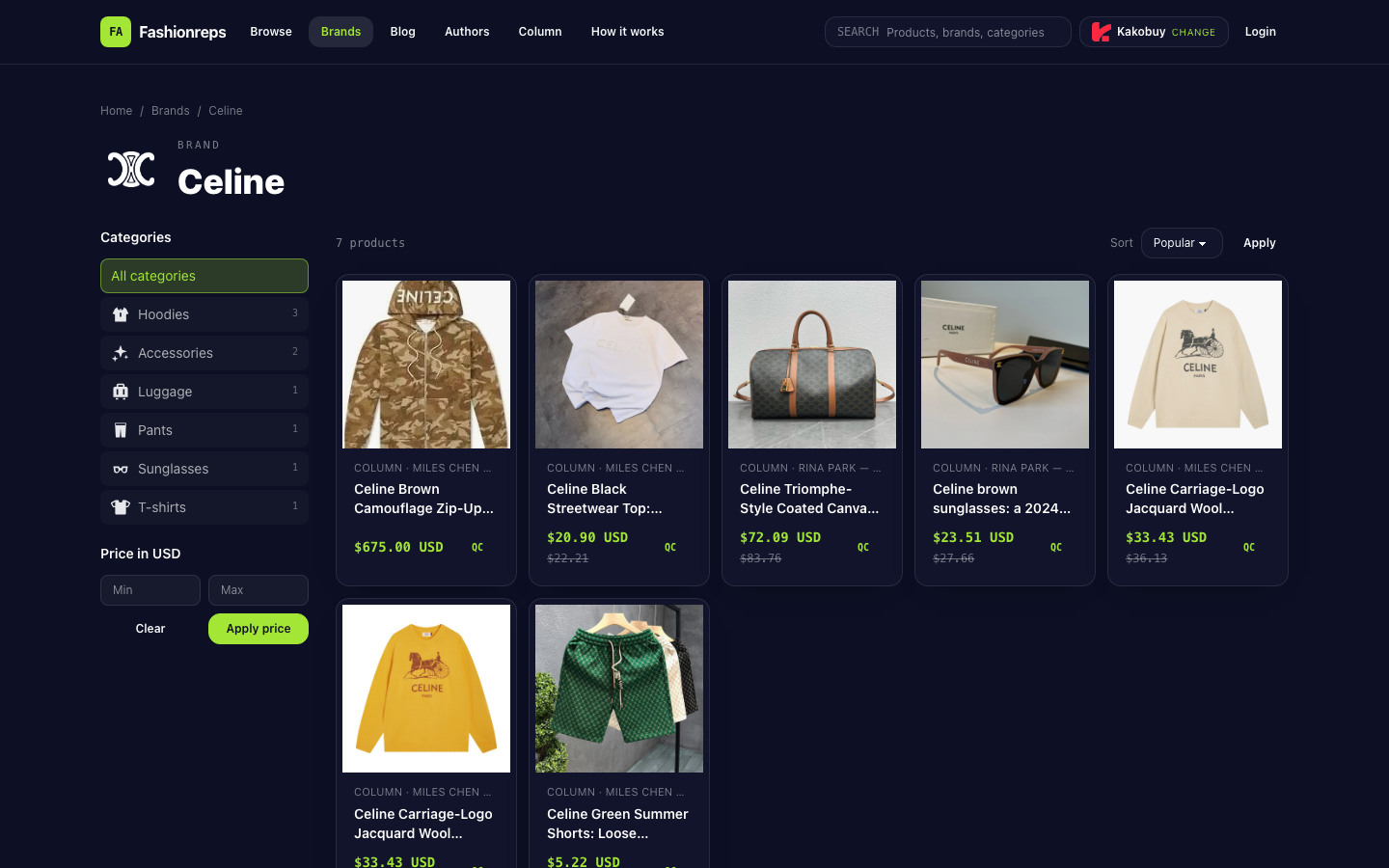
If your goal is to build a list of candidates worth verifying later from the Celine catalog on Fashionreps, the first step isn't sorting by price. It's confirming whether each page provides enough identifying information. The current Celine brand page shows 7 products, with categories including 2 accessories, 1 luggage bag, 1 pair of sunglasses, and some clothing. It's better for building a candidate range than for directly replacing product detail pages, QC photos, or final agent confirmation.
This article divides candidates into three states: information already shown on the page, information that needs to be confirmed with the agent, and information temporarily excluded because key fields are missing. This avoids mistaking "appeared in the catalog" for "verified and ready to buy."

Use the Brand Page to Build Your Candidate Range
Fashionreps' Celine brand page offers a brand entry point, category filters, price range filters, and sorting options. The categories currently shown include All categories, Hoodies, Accessories, Luggage, Pants, Sunglasses, and T-shirts. If you only want to filter for leather goods or travel-related candidates, check Accessories and Luggage first, then separately note non-leather accessories like sunglasses to avoid mixing items with different uses in the same batch of candidates.
Items related to accessories or luggage on the page include:
- Celine Triomphe-Style Coated Canvas Travel Duffle With Gold Lock, page lists size as 50 cm, reference price $72.09.
- Celine brown sunglasses, page says brown everyday style, reference price $23.51.
These two entries can go into your initial candidate list, but "50 cm" only means the page displays one length field. You can't infer the bag's length, width, height, internal capacity, whether it fits specific devices, or whether it includes other accessories. Similarly, for the sunglasses page, you can't judge from the color name alone whether the lenses, size, or detail version match.
What Fields to Record for Each Candidate
Start with a basic record of one row per product, then add variant rows for products with multiple colors, sizes, or image versions. When product names are similar, variant rows are easier to review than piling information into a notes column.
| Field | How to Record | Currently Confirmable |
|---|---|---|
| Product Name | Keep the page's original text; add a Chinese abbreviation if needed | Product names visible on Celine brand page |
| Category | Record the category shown on the page | Accessories, luggage bag, sunglasses, etc. |
| Color | Distinguish the page name from the actual color in images | Travel duffle page doesn't give a clear color in the catalog summary; sunglasses are labeled brown |
| Size or Capacity | Record length, width, height, and capacity separately; don't combine into one vague note | Travel duffle page shows 50 cm, but other dimensions and capacity not in catalog summary |
| Variants | One row per color, size, or material option | Catalog summary doesn't list full variant details |
| Variant Images | Record corresponding images, not just the main product image | Need to go to product detail page to verify |
| Product Detail Link | Save the page URL for that product and variant | Current catalog summary doesn't provide a directly reviewable detail link |
| Reference Price | Keep USD value and page date | Travel duffle $72.09, sunglasses $23.51 |
| Info Status | Use "Shown on page," "Needs agent confirmation," or "Not a candidate" | Recommended as a required field |
Price fields only serve as reference information shown on the page at that time. It doesn't equal the final payment amount, nor include possible service fees, domestic shipping, international shipping, or other charges. Current evidence doesn't provide stock, shipping, or ordering availability, so you can't judge whether the item is still purchasable.
Use Three States to Control Candidate Quality
"Shown on page" means the field can be found directly on Fashionreps' brand page or product detail page. For example, the travel duffle entry shows 50 cm, and the sunglasses entry shows brown and a reference price. This info can be entered first, but keep the source page and check date.
"Needs agent confirmation" applies when the product appears in the catalog, but color, full dimensions, capacity, specific variants, stock, or current availability aren't sufficiently explained. The travel duffle currently fits here: the page name and 50 cm field are enough to identify it as an initial candidate, but not enough to complete a pre-purchase judgment.
"Not a candidate" applies when critical identifying fields are missing, images can't be matched to variants, links are broken, or the product is clearly delisted or sold out. Don't keep incomplete entries just to fill the table; put them in a separate "pending evidence" area to avoid mixing them with candidates that can be further verified.
Split Tasks Between Mobile Browsing and Google Sheets
Browsing Fashionreps on mobile is good for quickly narrowing down from the brand entry, category filters, and product cards, and for directly viewing product names, reference prices, and displayed category info. It's great for discovering candidates and going back to the page to check images, but aligning fields across multiple products, filtering status, and counting missing items is difficult.
Google Sheets is better for structured organization once candidates are established. You can set "Info Status" as a fixed dropdown, then filter by category, color, whether size is present, whether variant images exist, and whether agent confirmation is needed. For collaboration, one person can fill in product links while another checks images and sizes, reducing the need to repeatedly open the same page.
Suggested column order, balancing mobile viewing and later organization:
- Product Name
- Category
- Color
- Variant Name
- Length
- Width
- Height
- Capacity
- Variant Image Verified
- Product Detail Link
- Reference Price
- Info Status
- Questions to Confirm
- Check Date
Don't enter "None" when you mean "Unknown." "None" means the page explicitly states that attribute doesn't exist; "Unknown" means current evidence is insufficient. Keeping them separate helps later filtering accurately identify products needing more information.
A Practical Verification Workflow
Start by opening the Celine brand page, use category filters to view Accessories and Luggage, and note product names that might fall within your target range. Then create a base row for each product, entering the category, color, and reference price that the page clearly shows.
Next, go to the corresponding product detail page, check if the product name still matches, and split different colors, sizes, or image versions into separate variants. If the page shows only one size field, such as 50 cm, record only that field—don't fill in width, height, or capacity on your own.
Then check whether variant images can be matched to color or size. If images can't be matched, change the status to "Needs agent confirmation" and write in the questions column: "Please confirm the color, size, or material version corresponding to the image." Avoid vague phrases like "looks the same."
Finally, add the product detail link, page check date, and current info status. If the product page is dead, clearly sold out, or missing critical evidence for further verification, move it to "Not a candidate" or "Pending evidence." A product appearing on a catalog page does not mean it has passed pre-purchase verification.
What Can We Conclude About These Celine Candidates Now?
The current page is enough to build a Celine catalog-level candidate table and confirm that the travel duffle entry shows 50 cm, the sunglasses entry is labeled brown, and record the corresponding reference prices. But the existing catalog evidence doesn't provide complete dimensions, capacity, all variant images, stock, shipping, or final purchase terms.
Therefore, the safest approach is to list the travel duffle and brown sunglasses as candidates "pending detail page verification," rather than writing them as confirmed purchase recommendations. After each candidate has complete color, variant images, size fields, and valid detail links, then decide whether to hand them to the agent for further confirmation.
Editor score 4.2 / 5