If you're looking for Adidas fall/winter jackets, the real problem isn't usually "how many products can I see," but whether you can quickly confirm the style, note sizes and colors, keep product links, and avoid reopening dead pages during later comparisons. This
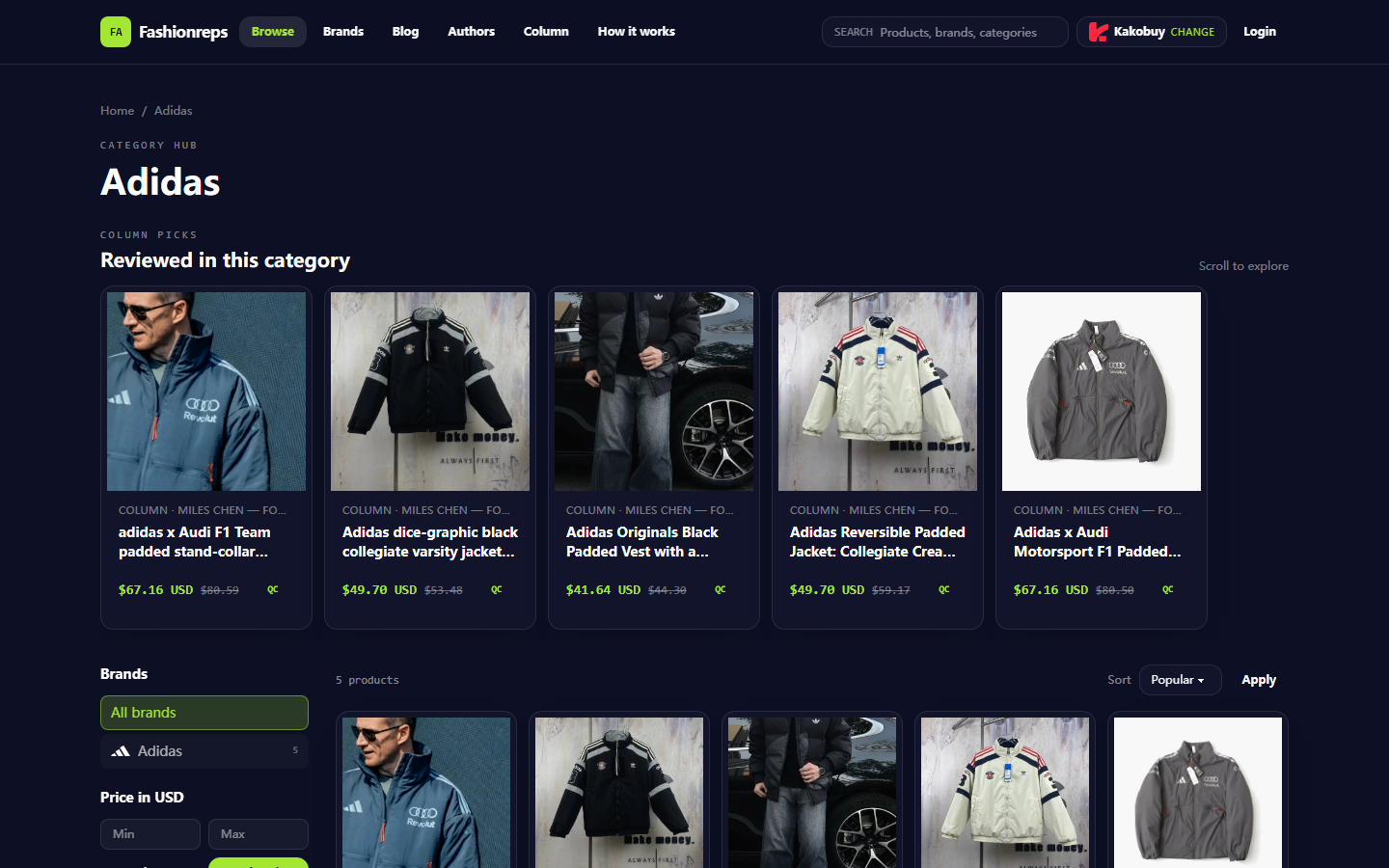

If you're looking for Adidas fall/winter jackets, the real problem isn't usually "how many products can I see," but whether you can quickly confirm the style, note sizes and colors, keep product links, and avoid reopening dead pages during later comparisons. This guide uses the Adidas jacket catalog visible on fashion-reps as its subject, comparing the boundaries between a site-style product catalog and Google Sheets.
This article is for those who need to organize multiple candidate products, prepare to verify product details further, or collaborate with others on filtering. It's not for treating reference prices in the catalog as final order amounts, nor for confirming stock, sizes, colors, materials, or shipping costs without opening the product detail page. 🧥
First, Define Your Adidas Jacket Filtering Goals
Before starting, write down the filtering criteria as executable conditions:
Product category: jackets, padded coats, vests, or other fall/winter outer layers
Brand: Adidas
Style direction: racing theme, baseball jacket, down or padded coat, reversible design, etc.
Fields to keep: product name, reference price, size, color, product detail page, verification date, and notes
Next action: open the detail page to verify specifications, then decide whether to add to cart or hand off to a shopping agent
The verification record for fashion-reps' Adidas category page shows that the page provides brand filtering, USD price range filtering, sorting options, and displays product cards. The current visible catalog has 5 Adidas products, with cards including name, reference price, and QC badge. The page also states that orders, payments, and shipping are handled by an external shopping agent site, so the catalog page itself cannot replace the order page.
You need to distinguish three types of information:
Catalog card info: suitable for quick discovery and initial comparison.
Product detail info: used to verify available sizes, colors, images, seller information, and link status.
Shopping agent info: used to confirm actual ordering, payment, warehouse inspection, shipping, and after-sales process.
fashion-reps Site-Style Spreadsheet: Category and Search Paths
The advantage of a site-style catalog is that products are organized by theme first. After entering the Adidas category, you can browse cards first, then narrow down by brand, price, and sorting. For those who just want to quickly discover fall/winter styles, this path saves prep time compared to starting from a blank spreadsheet.
The verified Adidas category page shows the following types of card information:
| Field visible in catalog | Suitable for | Cannot directly prove |
|---|---|---|
| Product name | Judging style theme and initial classification | Cannot alone prove size stock or material |
| Reference price | Conducting initial price comparison of candidates | Cannot be equated with final product price, agent service fee, or shipping |
| Brand filter | Narrowing to Adidas products | Cannot prove every product is still purchasable |
| Price range and sorting | Handling longer candidate lists | Cannot replace detail page verification |
| QC badge | Indicating presence of quality control related content | Cannot automatically prove the condition of the product you receive |
Examples of reference prices on the page include product card prices from about $41.64 to $67.16, but these numbers should be considered catalog display values. Prices, stock, and availability can change; when recording, save the verification date and reopen the detail page before preparing to order.
The site-style catalog is better for this path:
First browse by brand or category
Identify style direction via product name
Use price filtering and sorting to reduce candidate count
Open product detail page to verify specs
Copy confirmed products into your own record sheet
Don't judge "has size" or "has color" based solely on product cards. If the card doesn't show those fields, mark it in your sheet as "pending detail page verification" instead of filling it in yourself. 🔎
Building Filter Columns in Google Sheets
Google Sheets is better for saving candidate products you've already discovered. It's recommended to first create a header row with field names, then enter items one by one; don't stuff multiple products into a single cell.
You can use the following columns:
Product name
Brand
Category
Style keywords
Color
Size range
Reference price USD
Product link
Detail page accessibility
Are images sufficient to judge style?
QC or spec notes
Last verification date
Status
Next action
For "Color" and "Size," you must distinguish between confirmed, not shown, and pending verification. For example:
Color: black, visible on detail page
Color: not shown, pending detail page verification
Size: unconfirmed, don't guess based on common sizes
After setting up filters, you can first filter by "Status" to show items pending verification, then sort by "Reference Price USD." For collaboration, it's best if each person handles only one type of action, such as one person filling in detail page fields and another checking links, to avoid overwriting the same row simultaneously.
Google Sheets is suited for adding human-judgment columns like "Keep or not," "Reason not suitable," and "Next action." These fields are things a website catalog usually won't do for you, and they're the main value of a spreadsheet in comparison tasks. 📊
Item-by-Item Comparison: Product Cards vs Spreadsheet Rows
The relationship between site catalog and Google Sheets isn't either/or; it's a sequence of discovery and organization:
Site catalog: lets you see candidate products.
Product detail page: supplements specific specs and purchase entry.
Google Sheets: saves comparison results and follow-up actions.
Adopt a one-product-per-row rule. When product names are similar, don't use only abbreviations; keep enough of the name to distinguish styles, such as color, theme, reversible design, or fit information.
If the same product is found on different pages, you can keep one row and note the duplicate sources in the remarks. If a product link leads to an empty page, wrong page, or doesn't show the product name, set the status to "Link needs review" and don't continue treating it as a valid candidate.
You can use these status values:
Newly discovered
Detail page opened
Size pending verification
Color pending verification
Link needs review
Added to candidates
Not considering for now
Such statuses are easier to filter than color coding alone and reduce misunderstandings in collaboration.
How to Save Fall/Winter Style Images and Specifications
Product images help you distinguish appearance, colors, and design elements, but they cannot prove feel, warmth, actual thickness, or fit. When saving images, record the corresponding product row and source page to avoid mixing images from different products.
For fall/winter jackets, focus on recording:
Can you see front and back?
Visible details like collar, pockets, zippers, and badges
Is the lining or filling structure shown?
Is there a reversible or double-sided design?
Are images clear enough to judge colors?
Do images come from the product detail page, not search result thumbnails?
If you only see catalog card images, mark image status as "preliminary reference." Only after confirming the correspondence between image and product name on the detail page can you change it to "verified." Don't treat catalog images as actual QC evidence, and don't use images to infer unshown sizes and materials.
How to Mark Link Update Times and Missing Information
Link maintenance is the most easily overlooked part of such filtering sheets. After each visit to a product detail page, update at least the following:
Verification date.
Is the page accessible?
Does the page display a clear product name?
Are sizes and colors visible?
Do product images still correspond to the current product?
Does the product require further action through an external shopping agent?
Use three levels: "Confirmed," "Partially confirmed," and "Unconfirmed":
Confirmed: page accessible, product name clear, and target fields visible on detail page.
Partially confirmed: page accessible, but sizes, colors, or other key fields missing.
Unconfirmed: link broken, redirect error, empty page, or cannot confirm product correspondence.
If a link is inaccessible twice in a row, keep the original link and mark "pending review" rather than deleting it. This preserves your research record and avoids searching for the same style again later.
Prices should also have a separate verification date. Reference prices from the catalog should not overwrite historical records; if the price changes, add a "latest verified price" and keep the old value to track changes rather than assuming entry errors. 📅
Boundaries of the Two Methods
A site-style catalog is good for discovery and initial filtering; Google Sheets is good for organizing, collaborating, and continuous re-verification. The former reduces the cost of searching from scratch; the latter makes your judgment process reviewable.
If you have only a few candidate products, you can do initial comparison directly using the catalog and detail pages. If you have many candidates or need to compare sizes, colors, prices, and link statuses, set up a spreadsheet. For collaboration, the sheet can also record who's responsible, last modified time, and to-do items.
Don't treat Google Sheets as an inventory system, and don't treat website cards as an order system. Neither can replace the external shopping agent's payment, warehouse inspection, consolidation, shipping, tracking, customs, and after-sales process. Specific fees and restrictions need to be reconfirmed before ordering, based on destination country, package weight, route, and agent rules.
Action Checklist After Filtering
After filtering Adidas fall/winter jackets, continue in this order:
Delete duplicate rows, but keep notes on duplicate sources.
Open each candidate product detail page.
Verify the product name is clear.
Separately confirm sizes and colors; don't infer from images.
Update reference price and verification date.
Check if the link still opens.
Record whether images are clear enough and whether QC-related information exists.
After selecting a few candidates, go to the shopping agent page to verify actual order conditions.
Before ordering, reconfirm product price, available specs, service fee, shipping, and destination country requirements.
The time saved mainly comes from reducing repeated opening and comparing, not guaranteeing lower product prices. Creating a spreadsheet adds entry and maintenance costs but reduces the risk of missing sizes, colors, or broken links. This method suits those who need to compare multiple Adidas fall/winter candidates, collaborate with others, or continue deciding after a few days; if you only want to buy one specific product, verifying the detail page directly might be more appropriate.
Editor score 4.2 / 5