Goal and Uncertainties of the Cargo Pants Candidate List If your goal is to discover Carhartt cargo pants on Fashionreps and compile a candidate list that you can continue to verify, compare, and prepare for purchase, the key is not to collect as many items as possible first, but to make each row answer three questions: what style is this, what size evidence is there, and what should be checked next. Fashionreps' Carhartt
Goal and Uncertainties of the Cargo Pants Candidate List
If your goal is to discover Carhartt cargo pants on Fashionreps and compile a candidate list that you can continue to verify, compare, and prepare for purchase, the key is not to collect as many items as possible first, but to make each row answer three questions: what style is this, what size evidence is there, and what should be checked next.
Fashionreps' Carhartt brand catalog currently shows a Pants category, with multiple cargo pants, jeans, and shorts entries. The catalog information includes product names, reference prices, some color or fit descriptions, and product categories, but this content cannot automatically be equated with complete size charts, real-time inventory, fabric measurements, or final landed costs. The verification date for this article is October 13, 2026, and prices and page statuses should be rechecked before submitting candidates.
This list is suitable for discovering candidates, recording evidence, and scheduling follow-up checks, but it is not meant to replace size selection, inventory confirmation, or purchase decisions. 🚧
Finding Categories and Keywords in the Fashionreps Site-Style Spreadsheet
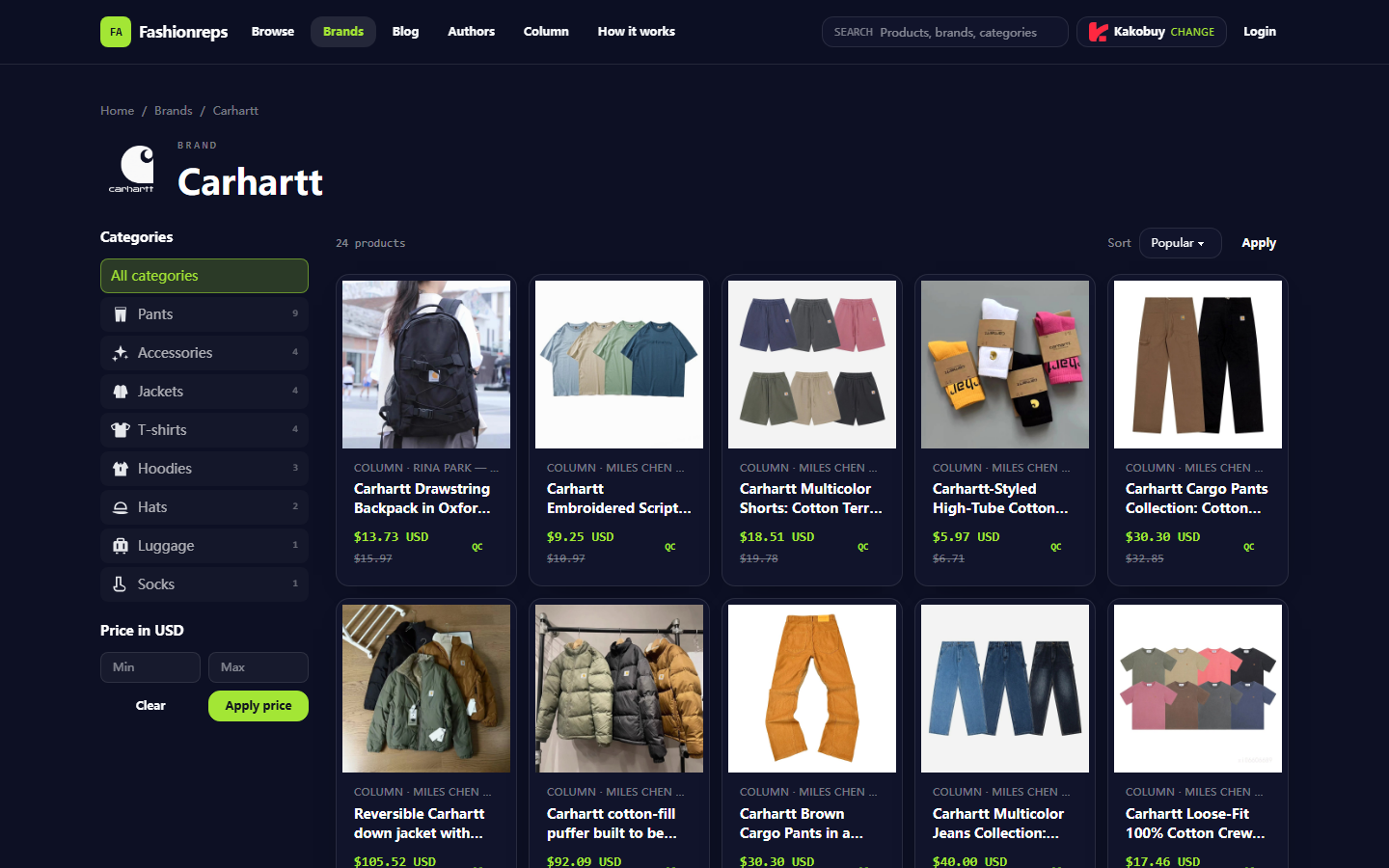
Start by entering the Carhartt brand catalog, rather than directly copying search results into a table. The current page shows brand, category, price filter, and sorting entry points; the Carhartt catalog displays categories such as Pants, Accessories, Jackets, T-shirts, Hoodies, Hats, Luggage, and Socks. For cargo pants candidates, first select Pants, then observe whether product names contain words like cargo, pants, straight leg, cotton, washed, or other terms that can indicate fit and material.
Product names in the catalog can help you quickly narrow down the range. For example, entries visible on the page such as Carhartt Cargo Pants Collection, Carhartt Brown Cargo Pants in a Washed Cotton Straight Leg, and multicolor cargo pants can all be used as candidate leads. However, the presence of words like cotton, straight-leg, or sizes M–XXL in the name only indicates that the page displays the corresponding description, not that the actual inseam, waist, hip, or inventory for each size has been confirmed.
It is recommended to follow this search sequence:
- Enter the Carhartt brand catalog and select the Pants category.
- Distinguish cargo, denim, shorts, and regular pants by product name, avoiding mixing different bottoms in the same group.
- Open the candidate product page to see if there are explicit size fields, color fields, images, product links, and purchase entry points.
- Record what you have seen on the page, and mark what you have not seen as pending confirmation, rather than filling in with common size experience.
- Keep different colors or fits of the same product as separate variants, unless the page clearly states they share sizing and links.
The Fashionreps page also shows that you can select different shopping agents, and the Buy button will enter the currently selected agent's entry point. This platform path is suitable for discovering products and continuing to view purchase entry points, but the agent, warehouse, logistics, fees, and after-sales rules may vary depending on the service provider selected. Therefore, the candidate list should additionally record the current purchase entry point or agent status, and not treat the catalog price as a complete order quote.

Caption: The Carhartt brand catalog page is used to confirm categories and visible product descriptions; sizes, inventory, and final costs still need to be checked item by item by opening product pages.
How to Design Size, Color, and Link Fields in Google Sheets
Google Sheets is better suited for organizing scattered page observations into a filterable, collaborative, and continuously updatable candidate list. The core of the table is not to save a product name, but to separate "confirmed", "not displayed on page", and "needs to be asked".
It is recommended to set up at least the following fields:
- candidate_id: Candidate number, e.g., CAR-P-001.
- product_name: The product name displayed on the page, try to keep the original text.
- category: cargo pants, straight-leg pants, jeans, or shorts.
- fit_description: The fit description explicitly written on the page, such as straight leg or loose fit.
- material_text: The material text visible on the page, do not rewrite it into empirical conclusions.
- color: The color or color group displayed on the page; multiple colors can be split into multiple rows.
- listedsizerange: The size range explicitly displayed on the page, e.g., M–XXL.
- sizechartstatus: Complete, partial, not displayed, or to be asked.
- waistcm, hipcm, outseamcm, inseamcm: Only fill in these if the page or seller provides specific numbers.
- size_source: Whether the size numbers come from the product page, seller reply, image text, or other sources.
- product_url: Save the product page address, not just the brand catalog address.
- pricedisplayedusd: Record the reference price displayed on the page, and note the verification date.
- image_status: Whether there are clear images, and whether the images can support identifying fit or color.
- qc_status: Whether the page provides QC or other inspection evidence; if not, write "not seen".
- agent_entry: The currently selected shopping agent or purchase entry point.
- missing_evidence: Information not yet confirmed.
- next_action: The specific action to take next.
- checked_at: The last verification time.
Among these, size fields should avoid mixing. listedsizerange records the letter or number sizes displayed on the page, waistcm, hipcm, etc. record measurement values, and size_source records the evidence source. This avoids miswriting "page shows M–XXL" as "waist range confirmed". 📏
| Field | What to record | What not to write |
|---|---|---|
| listedsizerange | Size options or range explicitly displayed on the page | Inferred suitable height and weight |
| waist_cm | Waist number provided by page or seller | Waist estimated from M, L, XL |
| color | Colors or color groups listed on the page | Colors guessed from compressed images |
| product_url | Specific product page address | Only catalog or search page address |
| missing_evidence | Size, inventory, or cost information not yet obtained | Replacing evidence with "should have" |
If the page provides a size chart as an image, it is recommended to manually transcribe the numbers on the image into separate fields, and note "product page size chart image" in size_source. Do not place multiple units in the same cell, and do not write waist, inseam, and hip all into one hard-to-filter note.
Item-by-Item Verification Steps Between Website Product Pages and Table Records
After completing the initial discovery, open product pages row by row for verification. Each candidate should undergo at least the following checks:
- Does the product name match the candidate name in the catalog, and are there differences in fit, color, or material?
- Does the product page indeed belong to cargo pants, and not shorts, jeans, or other bottoms?
- Does the page display size options, and does it also provide specific measurements?
- Is color an independently selectable variant, or is it just summarized in the title as multiple colors?
- Can the images help identify pocket structure, hem shape, waistband, or obvious design features?
- What are the reference price, original price, or discount information displayed on the page, and what is the verification date?
- Does the page have a purchase entry point, and is that entry affected by the currently selected shopping agent?
- Can you see QC, seller notes, inventory hints, or other evidence that supports purchase decisions?
After verification, do not just mark the result as "passed". A more useful approach is to write evidencestatus and nextaction separately. For example, if the size range is displayed but no centimeter numbers are given, evidencestatus can be "size options seen, measurements missing", and nextaction can be "ask for waist, hip, and inseam". This way other collaborators can take over directly without having to re-read the entire page.
Price should also be handled separately. The reference price in the Fashionreps catalog can be recorded at the time of page discovery, but it is not equivalent to the final payment amount for the product. Shipping, agent service fees, warehousing, international shipping, taxes, and other order costs need to be confirmed separately in the actual purchase path. Do not directly name the reference price as landedcost or totalcost in the candidate table. 💵
How to Record Pending Items When Size Descriptions Are Incomplete
Incomplete size information is the most common risk in a candidate list. The page may only show M–XXL, only have a size image, or only give a fit description like "loose fit". In these cases, you should keep the candidate, but lower the evidence level and clearly mark the fields that block purchase decisions.
The following recording methods can be used:
- Page only has letter sizes: record listedsizerange, leave other measurement fields empty.
- Page only has a size image but the numbers are blurry: record sizechartstatus as partial, and mark that clearer image or text confirmation is needed.
- Page has waist but no inseam: fill in waistcm, leave inseamcm empty, and point next_action to inseam confirmation.
- Page has multiple colors but no per-color inventory: record colors as visible page options, and note inventory unconfirmed.
- Page only has "wide color range" in the title: do not expand into a specific color list.
- Page shows M–XXL: do not infer that S, XS, or other unshown sizes are available.
To avoid duplicate requests, you can first group missing fields by product, and then ask the same seller or product page once for all. If multiple candidates lack the same information, you can use filters in Google Sheets to find rows with incomplete sizechartstatus, complete a round of centralized verification, and then update the status.
Size judgments should revolve around actual wearing needs, but do not disguise general body type advice as product measurement results. The candidate list can add a fit_note, such as "need to confirm if waistband has elastic", "page only states loose fit", "inseam still unknown for tall buyers", rather than directly writing "suitable for a certain height".
Evidence Hierarchy for Images, Specifications, and Community Leads
Images, specification text, and community information serve different purposes and cannot be placed on the same evidence level. Product images can usually help confirm style and color, but cannot reliably prove fabric feel, abrasion resistance, actual thickness, or wearing effect. Specification text can support size and material fields, but it still needs to be confirmed which page it comes from. Community leads can hint at common issues, but cannot replace fact-checking on the current product page.
The following hierarchy can be used for organization:
- Product name, category, size options, color, and reference price directly visible on the page: record as page facts.
- Size chart, product description, and visible images on the product page: used to supplement specific specs, but record the original location.
- Clear replies from sellers or purchase entry points: record the reply date and corresponding candidate.
- QC images or other inspection materials: only describe what is actually visible in the images, do not extend to quality assurance.
- Community discussions or experience sharing: treat as leads to be verified, cannot alone support conclusions about inventory, price, sizing, or authenticity.
If community discussions can only be partially read, record them as partially read, and do not use a few comments to summarize the entire discussion. For high-risk judgments such as brand, material, authenticity, and durability, never draw conclusions based solely on images or a single comment.
Image fields should also be kept restrained. The specified image in this article is used to illustrate the visible categories and product listing in the Carhartt brand catalog, not as physical QC proof for a particular pair of cargo pants. The source and purpose of images in the article should be retained in the content record, and accurate alt text should be used when publishing, without describing the image as purchased, received, or worn and verified. 🖼️
Boundaries Between the Two Tools for Quick Discovery and Long-Term Maintenance
The division of labor between the site-style Spreadsheet and Google Sheets is different. Fashionreps is more suitable for discovering products, browsing brands and categories, viewing catalog images, and entering product pages; Google Sheets is more suitable for saving fields, filtering missing information, collaborating with multiple people, recording verification times, and maintaining candidate statuses.
| Work step | Fashionreps site-style Spreadsheet | Google Sheets |
|---|---|---|
| Discover products | Discover candidates through brand, category, search, and catalog browsing | Save discovered candidates and sources |
| View products | Open product pages, images, and purchase entry points | Record page observations, not replace product pages |
| Size organization | Rely on fields actually visible on product pages | Split columns by size range, measurements, and evidence source |
| Multi-color management | Check if page provides colors or color groups | Each verifiable variant can be in a separate row |
| Review gaps | Reopen pages to confirm changes | Filter pending items by status |
| Team collaboration | Mainly for browsing and discovery | Suitable for division of work, notes, timestamps, and status updates |
| Price maintenance | Check current reference price displayed on page | Save verification date, not treating historical values as current |
Do not treat Google Sheets as a proof system for product authenticity, real-time inventory, or final price. It saves your verification records, and records themselves become outdated. Conversely, do not treat the Fashionreps catalog as a long-term database: page products, prices, categories, and purchase entries may change, and important judgments still need to be re-confirmed on the specific product page.
Review Checklist Before Submitting Candidates and Next Actions
Before submitting for the next step of purchase or manual review, you can check each row according to the following list:
- The product indeed belongs to cargo pants, not shorts, jeans, or other categories.
- Product name, product page URL, and catalog source can correspond to each other.
- The current record includes the verification date and the currency displayed.
- listedsizerange matches the actually visible sizes, without adding unshown sizes.
- Specific measurements all have sources, and missing fields remain empty or are explicitly marked.
- Color records come from page text or identifiable product options, not guesses.
- Images are only used to support visible style or color judgments, not written as physical quality proof.
- Reference price is not miswritten as a total price including shipping, taxes, and agent fees.
- Shopping agent or purchase entry point has been recorded, and can be reopened if necessary.
- QC, inventory, seller replies, and community leads are distinguished by evidence level.
- Each row has a next_action, so that the next step can be executed directly by someone else.
The final candidate list can keep only a small number of high-evidence records, rather than pursuing quantity. Candidates with complete size information, clear colors, accessible links, and fewer missing items should be prioritized for the next step; entries with only name and reference price, but no measurements or purchase path, can be kept as leads to be verified.
This method saves time spent on repeated searching and repeated organizing, but the increased risk is that page facts in the table may change over time, and different colors or fits may be incorrectly merged. It is suitable for people who need multi-person collaboration, to continuously compare size fields, or to prepare batch verification of multiple Carhartt cargo pants candidates. It is not recommended to rely directly on this list in the following situations: product pages cannot be accessed, size fields are completely missing, purchase entry is unclear, prices are mistaken as final costs, or you cannot re-confirm inventory, sizing, and destination-related costs before ordering.
The next step should first filter out candidates with incomplete sizechartstatus but clear styles, reopen product pages and complete key fields such as waistcm, hipcm, inseam_cm; only after these information and purchase entry points can be rechecked should you proceed to size selection and order verification.
Article Image
Redaktionsnote 4.2 / 5